


[Dec 25, 2025] Get New Associate-Developer-Apache-Spark-3.5 Certification Practice Test Questions Exam Dumps
Real Associate-Developer-Apache-Spark-3.5 Exam Dumps Questions Valid Associate-Developer-Apache-Spark-3.5 Dumps PDF
NEW QUESTION # 76
A Spark DataFrame df is cached using the MEMORY_AND_DISK storage level, but the DataFrame is too large to fit entirely in memory.
What is the likely behavior when Spark runs out of memory to store the DataFrame?
- A. Spark duplicates the DataFrame in both memory and disk. If it doesn't fit in memory, the DataFrame is stored and retrieved from the disk entirely.
- B. Spark will store as much data as possible in memory and spill the rest to disk when memory is full, continuing processing with performance overhead.
- C. Spark stores the frequently accessed rows in memory and less frequently accessed rows on disk, utilizing both resources to offer balanced performance.
- D. Spark splits the DataFrame evenly between memory and disk, ensuring balanced storage utilization.
Answer: B
Explanation:
When using the MEMORY_AND_DISK storage level, Spark attempts to cache as much of the DataFrame in memory as possible. If the DataFrame does not fit entirely in memory, Spark will store the remaining partitions on disk. This allows processing to continue, albeit with a performance overhead due to disk I/O.
As per the Spark documentation:
"MEMORY_AND_DISK: It stores partitions that do not fit in memory on disk and keeps the rest in memory. This can be useful when working with datasets that are larger than the available memory."
- Perficient Blogs: Spark - StorageLevel
This behavior ensures that Spark can handle datasets larger than the available memory by spilling excess data to disk, thus preventing job failures due to memory constraints.
NEW QUESTION # 77
43 of 55.
An organization has been running a Spark application in production and is considering disabling the Spark History Server to reduce resource usage.
What will be the impact of disabling the Spark History Server in production?
- A. Loss of access to past job logs and reduced debugging capability for completed jobs
- B. Enhanced executor performance due to reduced log size
- C. Improved job execution speed due to reduced logging overhead
- D. Prevention of driver log accumulation during long-running jobs
Answer: A
Explanation:
The Spark History Server provides a web UI for viewing past completed applications, including event logs, stages, and performance metrics.
If disabled:
Spark jobs still run normally,
But users lose the ability to review historical job metrics, DAGs, or logs after completion.
Thus, debugging, performance analysis, and audit capabilities are lost.
Why the other options are incorrect:
A: Disabling History Server doesn't manage logs.
B/D: Minimal overhead; disabling doesn't improve runtime speed or executor performance.
Reference:
Databricks Exam Guide (June 2025): Section "Apache Spark Architecture and Components" - Spark UI, History Server, and event logging.
Spark Administration Docs - History Server functionality and configuration.
NEW QUESTION # 78
In the code block below, aggDF contains aggregations on a streaming DataFrame:
Which output mode at line 3 ensures that the entire result table is written to the console during each trigger execution?
- A. append
- B. complete
- C. replace
- D. aggregate
Answer: B
Explanation:
The correct output mode for streaming aggregations that need to output the full updated results at each trigger is "complete".
From the official documentation:
"complete: The entire updated result table will be output to the sink every time there is a trigger." This is ideal for aggregations, such as counts or averages grouped by a key, where the result table changes incrementally over time.
append: only outputs newly added rows
replace and aggregate: invalid values for output mode
NEW QUESTION # 79
A developer runs:
What is the result?
Options:
- A. It appends new partitions to an existing Parquet file.
- B. It creates separate directories for each unique combination of color and fruit.
- C. It throws an error if there are null values in either partition column.
- D. It stores all data in a single Parquet file.
Answer: B
Explanation:
The partitionBy() method in Spark organizes output into subdirectories based on unique combinations of the specified columns:
e.g.
/path/to/output/color=red/fruit=apple/part-0000.parquet
/path/to/output/color=green/fruit=banana/part-0001.parquet
This improves query performance via partition pruning.
It does not consolidate into a single file.
Null values are allowed in partitions.
It does not "append" unless .mode("append") is used.
NEW QUESTION # 80
A developer wants to refactor some older Spark code to leverage built-in functions introduced in Spark 3.5.0.
The existing code performs array manipulations manually. Which of the following code snippets utilizes new built-in functions in Spark 3.5.0 for array operations?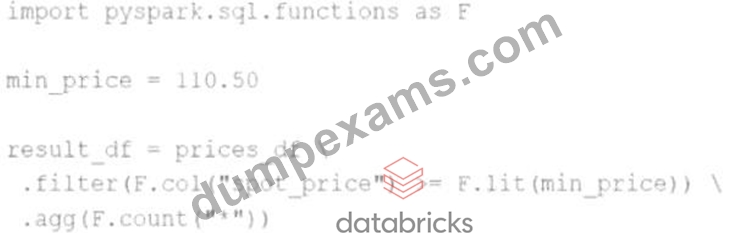
A)
B)
C)
D)
- A. result_df = prices_df \
.withColumn("valid_price", F.when(F.col("spot_price") > F.lit(min_price), 1).otherwise(0)) - B. result_df = prices_df \
.agg(F.count("spot_price").alias("spot_price")) \
.filter(F.col("spot_price") > F.lit("min_price")) - C. result_df = prices_df \
.agg(F.min("spot_price"), F.max("spot_price")) - D. result_df = prices_df \
.agg(F.count_if(F.col("spot_price") >= F.lit(min_price)))
Answer: D
Explanation:
Comprehensive and Detailed Explanation From Exact Extract:
The correct answer isBbecause it uses the new function count_if, introduced in Spark 3.5.0, which simplifies conditional counting within aggregations.
* F.count_if(condition) counts the number of rows that meet the specified boolean condition.
* In this example, it directly counts how many times spot_price >= min_price evaluates to true, replacing the older verbose combination of when/otherwise and filtering or summing.
Official Spark 3.5.0 documentation notes the addition of count_if to simplify this kind of logic:
"Added count_if aggregate function to count only the rows where a boolean condition holds (SPARK-
43773)."
Why other options are incorrect or outdated:
* Auses a legacy-style method of adding a flag column (when().otherwise()), which is verbose compared to count_if.
* Cperforms a simple min/max aggregation-useful but unrelated to conditional array operations or the updated functionality.
* Dincorrectly applies .filter() after .agg() which will cause an error, and misuses string "min_price" rather than the variable.
Therefore,Bis the only option leveraging new functionality from Spark 3.5.0 correctly and efficiently.
NEW QUESTION # 81
The following code fragment results in an error:
@F.udf(T.IntegerType())
def simple_udf(t: str) -> str:
return answer * 3.14159
Which code fragment should be used instead?
- A. @F.udf(T.IntegerType())
def simple_udf(t: float) -> float:
return t * 3.14159 - B. @F.udf(T.DoubleType())
def simple_udf(t: int) -> int:
return t * 3.14159 - C. @F.udf(T.DoubleType())
def simple_udf(t: float) -> float:
return t * 3.14159 - D. @F.udf(T.IntegerType())
def simple_udf(t: int) -> int:
return t * 3.14159
Answer: C
Explanation:
Comprehensive and Detailed Explanation:
The original code has several issues:
It references a variable answer that is undefined.
The function is annotated to return a str, but the logic attempts numeric multiplication.
The UDF return type is declared as T.IntegerType() but the function performs a floating-point operation, which is incompatible.
Option B correctly:
Uses DoubleType to reflect the fact that the multiplication involves a float (3.14159).
Declares the input as float, which aligns with the multiplication.
Returns a float, which matches both the logic and the schema type annotation.
This structure aligns with how PySpark expects User Defined Functions (UDFs) to be declared:
"To define a UDF you must specify a Python function and provide the return type using the relevant Spark SQL type (e.g., DoubleType for float results)." Example from official documentation:
from pyspark.sql.functions import udf
from pyspark.sql.types import DoubleType
@udf(returnType=DoubleType())
def multiply_by_pi(x: float) -> float:
return x * 3.14159
This makes Option B the syntactically and semantically correct choice.
NEW QUESTION # 82
A data scientist is analyzing a large dataset and has written a PySpark script that includes several transformations and actions on a DataFrame. The script ends with acollect()action to retrieve the results.
How does Apache Spark™'s execution hierarchy process the operations when the data scientist runs this script?
- A. The entire script is treated as a single job, which is then divided into multiple stages, and each stage is further divided into tasks based on data partitions.
- B. The script is first divided into multiple applications, then each application is split into jobs, stages, and finally tasks.
- C. Thecollect()action triggers a job, which is divided into stages at shuffle boundaries, and each stage is split into tasks that operate on individual data partitions.
- D. Spark creates a single task for each transformation and action in the script, and these tasks are grouped into stages and jobs based on their dependencies.
Answer: C
Explanation:
Comprehensive and Detailed Explanation From Exact Extract:
In Apache Spark, the execution hierarchy is structured as follows:
Application: The highest-level unit, representing the user program built on Spark.
Job: Triggered by an action (e.g.,collect(),count()). Each action corresponds to a job.
Stage: A job is divided into stages based on shuffle boundaries. Each stage contains tasks that can be executed in parallel.
Task: The smallest unit of work, representing a single operation applied to a partition of the data.
When thecollect()action is invoked, Spark initiates a job. This job is then divided into stages at points where data shuffling is required (i.e., wide transformations). Each stage comprises tasks that are distributed across the cluster's executors, operating on individual data partitions.
This hierarchical execution model allows Spark to efficiently process large-scale data by parallelizing tasks and optimizing resource utilization.
NEW QUESTION # 83
A data engineer wants to write a Spark job that creates a new managed table. If the table already exists, the job should fail and not modify anything.
Which save mode and method should be used?
- A. save with mode Ignore
- B. saveAsTable with mode ErrorIfExists
- C. save with mode ErrorIfExists
- D. saveAsTable with mode Overwrite
Answer: B
Explanation:
Comprehensive and Detailed Explanation:
The methodsaveAsTable()creates a new table and optionally fails if the table exists.
From Spark documentation:
"The mode 'ErrorIfExists' (default) will throw an error if the table already exists." Thus:
Option A is correct.
Option B (Overwrite) would overwrite existing data - not acceptable here.
Option C and D usesave(), which doesn't create a managed table with metadata in the metastore.
Final Answer: A
NEW QUESTION # 84
27 of 55.
A data engineer needs to add all the rows from one table to all the rows from another, but not all the columns in the first table exist in the second table.
The error message is:
AnalysisException: UNION can only be performed on tables with the same number of columns.
The existing code is:
au_df.union(nz_df)
The DataFrame au_df has one extra column that does not exist in the DataFrame nz_df, but otherwise both DataFrames have the same column names and data types.
What should the data engineer fix in the code to ensure the combined DataFrame can be produced as expected?
- A. df = au_df.union(nz_df, allowMissingColumns=True)
- B. df = au_df.unionByName(nz_df, allowMissingColumns=False)
- C. df = au_df.unionAll(nz_df)
- D. df = au_df.unionByName(nz_df, allowMissingColumns=True)
Answer: D
Explanation:
When two DataFrames have different column sets, the normal union() or unionAll() functions fail unless both have exactly the same columns in the same order.
Solution: Use unionByName() with allowMissingColumns=True.
This aligns columns by name and automatically adds missing columns with null values.
Correct syntax:
combined_df = au_df.unionByName(nz_df, allowMissingColumns=True)
This ensures the union works even if one DataFrame has extra or missing columns.
Why the other options are incorrect:
B: unionAll() is deprecated; also requires identical schemas.
C: With allowMissingColumns=False, Spark still throws a mismatch error.
D: union() doesn't accept the allowMissingColumns argument.
Reference:
PySpark API - DataFrame.unionByName() with allowMissingColumns option.
Databricks Exam Guide (June 2025): Section "Developing Apache Spark DataFrame/DataSet API Applications" - combining DataFrames and schema alignment.
NEW QUESTION # 85
A data engineer is reviewing a Spark application that applies several transformations to a DataFrame but notices that the job does not start executing immediately.
Which two characteristics of Apache Spark's execution model explain this behavior?
Choose 2 answers:
- A. Transformations are executed immediately to build the lineage graph.
- B. Transformations are evaluated lazily.
- C. Only actions trigger the execution of the transformation pipeline.
- D. The Spark engine requires manual intervention to start executing transformations.
- E. The Spark engine optimizes the execution plan during the transformations, causing delays.
Answer: B,C
Explanation:
Comprehensive and Detailed Explanation From Exact Extract:
Apache Spark employs a lazy evaluation model for transformations. This means that when transformations (e.
g.,map(),filter()) are applied to a DataFrame, Spark does not execute them immediately. Instead, it builds a logical plan (lineage) of transformations to be applied.
Execution is deferred until an action (e.g.,collect(),count(),save()) is called. At that point, Spark's Catalyst optimizer analyzes the logical plan, optimizes it, and then executes the physical plan to produce the result.
This lazy evaluation strategy allows Spark to optimize the execution plan, minimize data shuffling, and improve overall performance by reducing unnecessary computations.
NEW QUESTION # 86
Which UDF implementation calculates the length of strings in a Spark DataFrame?
- A. df.withColumn("length", spark.udf("len", StringType()))
- B. df.withColumn("length", udf(lambda s: len(s), StringType()))
- C. spark.udf.register("stringLength", lambda s: len(s))
- D. df.select(length(col("stringColumn")).alias("length"))
Answer: D
Explanation:
Comprehensive and Detailed Explanation From Exact Extract:
Option B uses Spark's built-in SQL function length(), which is efficient and avoids the overhead of a Python UDF:
from pyspark.sql.functions import length, col
df.select(length(col("stringColumn")).alias("length"))
Explanation of other options:
Option A is incorrect syntax;spark.udfis not called this way.
Option C registers a UDF but doesn't apply it in the DataFrame transformation.
Option D is syntactically valid but uses a Python UDF which is less efficient than built-in functions.
Final Answer: B
NEW QUESTION # 87
A data scientist of an e-commerce company is working with user data obtained from its subscriber database and has stored the data in a DataFrame df_user. Before further processing the data, the data scientist wants to create another DataFrame df_user_non_pii and store only the non-PII columns in this DataFrame. The PII columns in df_user are first_name, last_name, email, and birthdate.
Which code snippet can be used to meet this requirement?
- A. df_user_non_pii = df_user.drop("first_name", "last_name", "email", "birthdate")
- B. df_user_non_pii = df_user.dropfields("first_name, last_name, email, birthdate")
- C. df_user_non_pii = df_user.drop("first_name", "last_name", "email", "birthdate")
- D. df_user_non_pii = df_user.dropfields("first_name", "last_name", "email", "birthdate")
Answer: C
Explanation:
To remove specific columns from a PySpark DataFrame, the drop() method is used. This method returns a new DataFrame without the specified columns. The correct syntax for dropping multiple columns is to pass each column name as a separate argument to the drop() method.
Correct Usage:
df_user_non_pii = df_user.drop("first_name", "last_name", "email", "birthdate") This line of code will return a new DataFrame df_user_non_pii that excludes the specified PII columns.
Explanation of Options:
A . Correct. Uses the drop() method with multiple column names passed as separate arguments, which is the standard and correct usage in PySpark.
B . Although it appears similar to Option A, if the column names are not enclosed in quotes or if there's a syntax error (e.g., missing quotes or incorrect variable names), it would result in an error. However, as written, it's identical to Option A and thus also correct.
C . Incorrect. The dropfields() method is not a method of the DataFrame class in PySpark. It's used with StructType columns to drop fields from nested structures, not top-level DataFrame columns.
D . Incorrect. Passing a single string with comma-separated column names to dropfields() is not valid syntax in PySpark.
Reference:
PySpark Documentation: DataFrame.drop
Stack Overflow Discussion: How to delete columns in PySpark DataFrame
NEW QUESTION # 88
A developer is trying to join two tables, sales.purchases_fct and sales.customer_dim, using the following code:
fact_df = purch_df.join(cust_df, F.col('customer_id') == F.col('custid')) The developer has discovered that customers in the purchases_fct table that do not exist in the customer_dim table are being dropped from the joined table.
Which change should be made to the code to stop these customer records from being dropped?
- A. fact_df = purch_df.join(cust_df, F.col('customer_id') == F.col('custid'), 'right_outer')
- B. fact_df = cust_df.join(purch_df, F.col('customer_id') == F.col('custid'))
- C. fact_df = purch_df.join(cust_df, F.col('customer_id') == F.col('custid'), 'left')
- D. fact_df = purch_df.join(cust_df, F.col('cust_id') == F.col('customer_id'))
Answer: C
Explanation:
In Spark, the default join type is an inner join, which returns only the rows with matching keys in both DataFrames. To retain all records from the left DataFrame (purch_df) and include matching records from the right DataFrame (cust_df), a left outer join should be used.
By specifying the join type as 'left', the modified code ensures that all records from purch_df are preserved, and matching records from cust_df are included. Records in purch_df without a corresponding match in cust_df will have null values for the columns from cust_df.
This approach is consistent with standard SQL join operations and is supported in PySpark's DataFrame API.
NEW QUESTION # 89
A data engineer is working with a large JSON dataset containing order information. The dataset is stored in a distributed file system and needs to be loaded into a Spark DataFrame for analysis. The data engineer wants to ensure that the schema is correctly defined and that the data is read efficiently.
Which approach should the data scientist use to efficiently load the JSON data into a Spark DataFrame with a predefined schema?
- A. Use spark.read.json() with the inferSchema option set to true
- B. Define a StructType schema and use spark.read.schema(predefinedSchema).json() to load the data.
- C. Use spark.read.json() to load the data, then use DataFrame.printSchema() to view the inferred schema, and finally use DataFrame.cast() to modify column types.
- D. Use spark.read.format("json").load() and then use DataFrame.withColumn() to cast each column to the desired data type.
Answer: B
Explanation:
The most efficient and correct approach is to define a schema using StructType and pass it tospark.read.
schema(...).
This avoids schema inference overhead and ensures proper data types are enforced during read.
Example:
frompyspark.sql.typesimportStructType, StructField, StringType, DoubleType schema = StructType([ StructField("order_id", StringType(),True), StructField("amount", DoubleType(),True),
])
df = spark.read.schema(schema).json("path/to/json")
- Source:Databricks Guide - Read JSON with predefined schema
NEW QUESTION # 90
Which feature of Spark Connect is considered when designing an application to enable remote interaction with the Spark cluster?
- A. It can be used to interact with any remote cluster using the REST API
- B. It allows for remote execution of Spark jobs
- C. It provides a way to run Spark applications remotely in any programming language
- D. It is primarily used for data ingestion into Spark from external sources
Answer: B
Explanation:
Spark Connect introduces a decoupled client-server architecture. Its key feature is enabling Spark job submission and execution from remote clients - in Python, Java, etc.
From Databricks documentation:
"Spark Connect allows remote clients to connect to a Spark cluster and execute Spark jobs without being co-located with the Spark driver." A is close, but "any language" is overstated (currently supports Python, Java, etc., not literally all).
B refers to REST, which is not Spark Connect's mechanism.
D is incorrect; Spark Connect isn't focused on ingestion.
Final answer: C
NEW QUESTION # 91
What is a feature of Spark Connect?
- A. It has built-in authentication
- B. It supports DataStreamReader, DataStreamWriter, StreamingQuery, and Streaming APIs
- C. It supports only PySpark applications
- D. Supports DataFrame, Functions, Column, SparkContext PySpark APIs
Answer: B
Explanation:
Comprehensive and Detailed Explanation From Exact Extract:
Spark Connect is a client-server architecture introduced in Apache Spark 3.4, designed to decouple the client from the Spark driver, enabling remote connectivity to Spark clusters.
According to the Spark 3.5.5 documentation:
"Majority of the Streaming API is supported, including DataStreamReader, DataStreamWriter, StreamingQuery and StreamingQueryListener." This indicates that Spark Connect supports key components of Structured Streaming, allowing for robust streaming data processing capabilities.
Regarding other options:
B).While Spark Connect supports DataFrame, Functions, and Column APIs, it does not support SparkContext and RDD APIs.
C).Spark Connect supports multiple languages, including PySpark and Scala, not just PySpark.
D).Spark Connect does not have built-in authentication but is designed to work seamlessly with existing authentication infrastructures.
NEW QUESTION # 92
A Spark engineer must select an appropriate deployment mode for the Spark jobs.
What is the benefit of using cluster mode in Apache Spark™?
- A. In cluster mode, the driver is responsible for executing all tasks locally without distributing them across the worker nodes.
- B. In cluster mode, resources are allocated from a resource manager on the cluster, enabling better performance and scalability for large jobs
- C. In cluster mode, the driver runs on the client machine, which can limit the application's ability to handle large datasets efficiently.
- D. In cluster mode, the driver program runs on one of the worker nodes, allowing the application to fully utilize the distributed resources of the cluster.
Answer: D
Explanation:
Comprehensive and Detailed Explanation From Exact Extract:
In Apache Spark's cluster mode:
"The driver program runs on the cluster's worker node instead of the client's local machine. This allows the driver to be close to the data and other executors, reducing network overhead and improving fault tolerance for production jobs." (Source: Apache Spark documentation -Cluster Mode Overview) This deployment is ideal for production environments where the job is submitted from a gateway node, and Spark manages the driver lifecycle on the cluster itself.
Option A is partially true but less specific than D.
Option B is incorrect: the driver never executes all tasks; executors handle distributed tasks.
Option C describes client mode, not cluster mode.
NEW QUESTION # 93
Which feature of Spark Connect is considered when designing an application to enable remote interaction with the Spark cluster?
- A. It can be used to interact with any remote cluster using the REST API
- B. It allows for remote execution of Spark jobs
- C. It provides a way to run Spark applications remotely in any programming language
- D. It is primarily used for data ingestion into Spark from external sources
Answer: B
Explanation:
Comprehensive and Detailed Explanation:
Spark Connect introduces a decoupled client-server architecture. Its key feature is enabling Spark job submission and execution from remote clients - in Python, Java, etc.
From Databricks documentation:
"Spark Connect allows remote clients to connect to a Spark cluster and execute Spark jobs without being co- located with the Spark driver." A is close, but "any language" is overstated (currently supports Python, Java, etc., not literally all).
B refers to REST, which is not Spark Connect's mechanism.
D is incorrect; Spark Connect isn't focused on ingestion.
Final Answer: C
NEW QUESTION # 94
A data engineer is asked to build an ingestion pipeline for a set of Parquet files delivered by an upstream team on a nightly basis. The data is stored in a directory structure with a base path of "/path/events/data". The upstream team drops daily data into the underlying subdirectories following the convention year/month/day.
A few examples of the directory structure are:
Which of the following code snippets will read all the data within the directory structure?
- A. df = spark.read.parquet("/path/events/data/")
- B. df = spark.read.option("inferSchema", "true").parquet("/path/events/data/")
- C. df = spark.read.parquet("/path/events/data/*")
- D. df = spark.read.option("recursiveFileLookup", "true").parquet("/path/events/data/")
Answer: D
Explanation:
Comprehensive and Detailed Explanation From Exact Extract:
To read all files recursively within a nested directory structure, Spark requires therecursiveFileLookupoption to be explicitly enabled. According to Databricks official documentation, when dealing with deeply nested Parquet files in a directory tree (as shown in this example), you should set:
df = spark.read.option("recursiveFileLookup", "true").parquet("/path/events/data/") This ensures that Spark searches through all subdirectories under/path/events/data/and reads any Parquet files it finds, regardless of the folder depth.
Option A is incorrect because while it includes an option,inferSchemais irrelevant here and does not enable recursive file reading.
Option C is incorrect because wildcards may not reliably match deep nested structures beyond one directory level.
Option D is incorrect because it will only read files directly within/path/events/data/and not subdirectories like
/2023/01/01.
Databricks documentation reference:
"To read files recursively from nested folders, set therecursiveFileLookupoption to true. This is useful when data is organized in hierarchical folder structures" - Databricks documentation on Parquet files ingestion and options.
NEW QUESTION # 95
Given the code: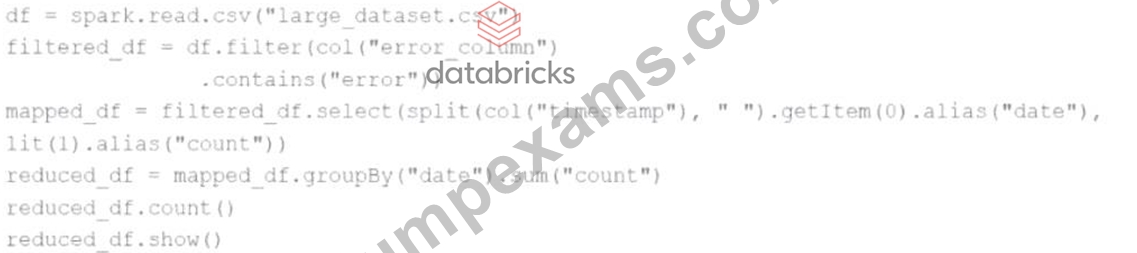
df = spark.read.csv("large_dataset.csv")
filtered_df = df.filter(col("error_column").contains("error"))
mapped_df = filtered_df.select(split(col("timestamp")," ").getItem(0).alias("date"), lit(1).alias("count")) reduced_df = mapped_df.groupBy("date").sum("count") reduced_df.count() reduced_df.show() At which point will Spark actually begin processing the data?
- A. When the filter transformation is applied
- B. When the show action is applied
- C. When the groupBy transformation is applied
- D. When the count action is applied
Answer: D
Explanation:
Spark uses lazy evaluation. Transformations like filter, select, and groupBy only define the DAG (Directed Acyclic Graph). No execution occurs until an action is triggered.
The first action in the code is:reduced_df.count()
So Spark starts processing data at this line.
Reference:Apache Spark Programming Guide - Lazy Evaluation
NEW QUESTION # 96
A Spark application is experiencing performance issues in client mode because the driver is resource- constrained.
How should this issue be resolved?
- A. Increase the driver memory on the client machine
- B. Switch the deployment mode to cluster mode
- C. Add more executor instances to the cluster
- D. Switch the deployment mode to local mode
Answer: B
Explanation:
Comprehensive and Detailed Explanation From Exact Extract:
In Spark's client mode, the driver runs on the local machine that submitted the job. If that machine is resource- constrained (e.g., low memory), performance degrades.
From the Spark documentation:
"In cluster mode, the driver runs inside the cluster, benefiting from cluster resources and scalability." Option A is incorrect - executors do not help the driver directly.
Option B might help short-term but does not scale.
Option C is correct - switching to cluster mode moves the driver to the cluster.
Option D (local mode) is for development/testing, not production.
Final Answer: C
NEW QUESTION # 97
An MLOps engineer is building a Pandas UDF that applies a language model that translates English strings into Spanish. The initial code is loading the model on every call to the UDF, which is hurting the performance of the data pipeline.
The initial code is:
def in_spanish_inner(df: pd.Series) -> pd.Series:
model = get_translation_model(target_lang='es')
return df.apply(model)
in_spanish = sf.pandas_udf(in_spanish_inner, StringType())
How can the MLOps engineer change this code to reduce how many times the language model is loaded?
- A. Convert the Pandas UDF to a PySpark UDF
- B. Convert the Pandas UDF from a Series # Series UDF to an Iterator[Series] # Iterator[Series] UDF
- C. Convert the Pandas UDF from a Series # Series UDF to a Series # Scalar UDF
- D. Run thein_spanish_inner()function in amapInPandas()function call
Answer: B
Explanation:
Comprehensive and Detailed Explanation From Exact Extract:
The provided code defines a Pandas UDF of type Series-to-Series, where a new instance of the language modelis created on each call, which happens per batch. This is inefficient and results in significant overhead due to repeated model initialization.
To reduce the frequency of model loading, the engineer should convert the UDF to an iterator-based Pandas UDF (Iterator[pd.Series] -> Iterator[pd.Series]). This allows the model to be loaded once per executor and reused across multiple batches, rather than once per call.
From the official Databricks documentation:
"Iterator of Series to Iterator of Series UDFs are useful when the UDF initialization is expensive... For example, loading a ML model once per executor rather than once per row/batch."
- Databricks Official Docs: Pandas UDFs
Correct implementation looks like:
python
CopyEdit
@pandas_udf("string")
def translate_udf(batch_iter: Iterator[pd.Series]) -> Iterator[pd.Series]:
model = get_translation_model(target_lang='es')
for batch in batch_iter:
yield batch.apply(model)
This refactor ensures theget_translation_model()is invoked once per executor process, not per batch, significantly improving pipeline performance.
NEW QUESTION # 98
A data scientist is working on a large dataset in Apache Spark using PySpark. The data scientist has a DataFramedfwith columnsuser_id,product_id, andpurchase_amountand needs to perform some operations on this data efficiently.
Which sequence of operations results in transformations that require a shuffle followed by transformations that do not?
- A. df.filter(df.purchase_amount > 100).groupBy("user_id").sum("purchase_amount")
- B. df.withColumn("purchase_date", current_date()).where("total_purchase > 50")
- C. df.withColumn("discount", df.purchase_amount * 0.1).select("discount")
- D. df.groupBy("user_id").agg(sum("purchase_amount").alias("total_purchase")).repartition(10)
Answer: D
Explanation:
Comprehensive and Detailed Explanation From Exact Extract:
Shuffling occurs in operations likegroupBy,reduceByKey, orjoin-which cause data to be moved across partitions. Therepartition()operation can also cause a shuffle, but in this context, it follows an aggregation.
InOption D, thegroupByfollowed byaggresults in a shuffle due to grouping across nodes.
Therepartition(10)is a partitioning transformation but does not involve a new shuffle since the data is already grouped.
This sequence - shuffle (groupBy) followed by non-shuffling (repartition) - is correct.
Option A does the opposite: thefilterdoes not cause a shuffle, butgroupBydoes - this makes it the wrong order.
NEW QUESTION # 99
......
Associate-Developer-Apache-Spark-3.5 Exam Dumps - PDF Questions and Testing Engine: https://www.dumpexams.com/Associate-Developer-Apache-Spark-3.5-real-answers.html
Latest Associate-Developer-Apache-Spark-3.5 Exam Dumps for Pass Guaranteed: https://drive.google.com/open?id=1NNam_T61AtXucOU_lZx7-H3vpy9Nv1LK