


Real 71300X Exam Questions are the Best Preparation Material
Practice on 2022 LATEST 71300X Exam Updated 70 Questions
NEW QUESTION 11
Which three functionalities does WebRTC provide? (Choose three.)
- A. NAT / Firewall Traversal
- B. adds click-to-call capabilities from a web application to an Avaya endpoint
- C. real-time audio and video conferencing
- D. Internet-friendly codecs and Privacy
Answer: A,B,C
Explanation:
Explanation
* One of the primary differentiating features for the WebRTC Snap-in is that the web application handles authentication and authorization of calls. This includes the capability to assert a calling user's phone number and restrict the numbers that can be called.
* The Avaya SBCE enables secure firewall traversal for HTTP and SRTP packets, facilitates sending DTLS to provide secured key exchange for the SRTP flow, and takes care of all security requirements mentioned in the TURN protocol for the solution.
* WebRTC can be a game changer for enterprise communications and customer engagement. Enterprises can now add real-time communications to any website.
References: Avaya WebRTC Snap-in Reference, Release 3.1 (May 2016), page 9
https://downloads.avaya.com/css/P8/documents/101013939
NEW QUESTION 12
On Avaya Session Border Controller for Enterprise (SBCE), which two ways can be used to view System Logs? (Choose two.)
- A. from CLI execute cat archive > syslog > ipcs.log
- B. from EMS web GUI SBCE Dashboard access Logs > System Logs
- C. from CLI execute cat > var > log > Avaya > syslog
- D. from System Manager web GUI > Alarms and Events
Answer: A,B
Explanation:
Explanation
C: Call Trace data are written to this location:
- /archive/syslog/ipcs/octeon.log
D: Viewing system logsProcedure
1. Log on to the EMS web interface with administrator credentials.
2. Select the Logs option from the toolbar, and click the System Logs menu.
The system displays the Syslog Viewer screen. On this screen, you can specify criteria in the Query Options section to filter the results displayed.
3. In the Start Date and End Date fields, filter the results displayed in a search report to fall within starting and ending dates and times. In previous Avaya SBCE Syslog Viewer windows, there were four separate fields:
Start Date, Start Time, End Date, and End Time.
References: Troubleshooting and Maintaining Avaya Session Border Controller for Enterprise (December
2015), page 21
Avaya Aura Session Border Controller Enterprise Implementation and Maintenance (2012), page 478
NEW QUESTION 13
In Avaya Session Border Controller for Enterprise (SBCE) 7.x, you need to download the 46xxsettings.txt file to a Remote Worker device.
What needs to be configured under DMZ Services > Relay Services?
- A. Application Relay and Reverse Proxy
- B. Application Relay and File Transfer
- C. Application Relay
- D. Reverse Proxy
Answer: C
Explanation:
Explanation
Relay Services are used to define how file transfers (e.g., for phone firmware upgrades and configuration), are routed to the Remote Worker endpoints.
Example: 2 For accessing the file server using HTTPS protocol
The following screenshot shows the newly created Relay Services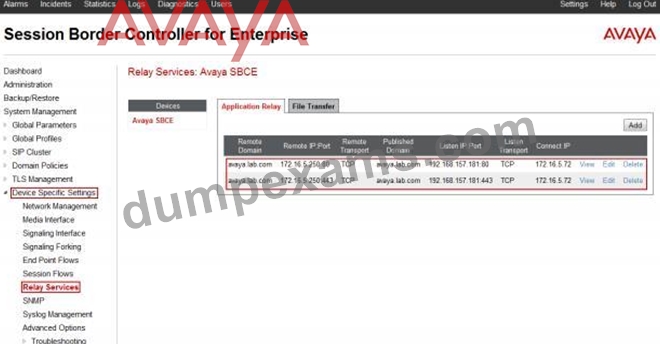
References: Configuring Remote Workers with Avaya Session Border Controller for Enterprise Rel. 6.2, Avaya Aura Communication Manager Rel. 6.3 and Avaya Aura Session Managers Rel. 6.3 - Issue 1.0, page 73
https://downloads.avaya.com/css/P8/documents/100183254
NEW QUESTION 14
In which location is the AAMS URI '[email protected]' configured?
- A. Elements > Breeze > Configuration > HTTP Security and as a Dial Pattern
- B. Elements > Breeze > Configuration > HTTP Security and as a Regular Expression
- C. Home > Elements > Breeze > Configuration > Avaya Aura Media Server and as a Dial Pattern
- D. Home > Elements > Breeze > Configuration > Avaya Aura Media Server and as a Regular Expression
Answer: D
Explanation:
Explanation
Creating the Avaya Aura Media Server Routing Pattern
Procedure
1. On System Manager, click Elements > Routing > Routing Policies.
2. Click New.
3. Type a Name for the Routing Policy.
4. From the SIP Entity as Destination field, click Select.
5. Select the Avaya Aura
Media Server SIP Entity that you created.
Select the Local Host Name FQDN SIP Entity if you are using High Availability for the Avaya Aura Media Server routing.
6. Click Commit.
7. Navigate to Home > Elements > Routing > Regular Expressions and click New.
8. In the Pattern field, type ce-msml@<sip-domain>.*
This sip-domain value must match:
* The SIP domain that you entered in the Home > Elements > Routing > Domains page.
* The default SIP domain that you entered on the Avaya BreezeTM Cluster Administration page.
9. Click Commit
https://downloads.avaya.com/css/P8/documents/101014426
References: Deploying Avaya Breeze, Release 3.1, (September 2016), page 55
NEW QUESTION 15
On Avaya Session Border Controller for Enterprise (SBCE), which statement about how to examine messages with Wireshark is true?
- A. You can start and stop a Packet Capture in the EMS web GUI and then you can open the .pcap file with Wireshark.
- B. Wireshark runs directly on Avaya Session Border Controller for Enterprise (SBCE).
- C. You have to start and stop the .pcap file using command line.
- D. They cannot be examined on this version.
Answer: A
Explanation:
Explanation
Viewing the Packet Capture with Wireshark.
0. Start a Packet Capture in the EMS web GUi.
1. After the capture completes, click the Capture tab.
2. Double-click on the capture file name.
3. The File Download window opens.
4. Click Open.
The Wireshark application opens the trace.
Note: The Wireshark call tracing tool can be used on virtual desktop for vLabs.
References: Avaya Aura Session Border Controller Enterprise Implementation and Maintenance (2012), page
468
NEW QUESTION 16
The Avaya WebRTC solution uses the web intensively to make media calls from a standard web browser in the internet, into internal and secure communication premises in the enterprise.
Which statement about security between the Enterprise-edge and those standard Web browsers in the internet is true?
- A. No trust relationship exists between enterprise edge security and web browsers; therefore, the security strategy is based on an Authorization Token instead.
- B. There must be a VPN connection between the Web Browser and the Enterprise-edge to build a WebRTC link.
- C. WebRTC only works within the Enterprise network. External Web Browsers must connect through an Avaya Session Border Controller for Enterprise (SBCE) via a SIP trunk.
- D. A trust relationship based on certificates must be built to make WebRTC work.
Answer: A
Explanation:
Explanation
Validation of the authorization token.
The WebRTC Snap-in will validate the authorization token created and encrypted by the web server. If the snap-in can decrypt the token and ensure that the time stamp is valid, it knows that the incoming HTTP request is valid. The time stamp will usually be short lived; on the order of 5-10seconds to protect against reply attacks.
References: Avaya WebRTC Snap-in Reference, Release 3.1 (May 2016), page 27
https://downloads.avaya.com/css/P8/documents/101013939
NEW QUESTION 17
The provisioning script automatically runs as part of the first boot-up of the Avaya Session Border Controller for Enterprise (SBCE). During this process you assign the Management IP address to the SBCE. You browse to the Element Management System (EMS) to continue to install the SBCE.
On the System Management > Devices web page, which status does the SBCE display before the Install link is clicked?
- A. Provisioned
- B. Commissioned
- C. Ready
- D. Registered
Answer: D
Explanation:
Explanation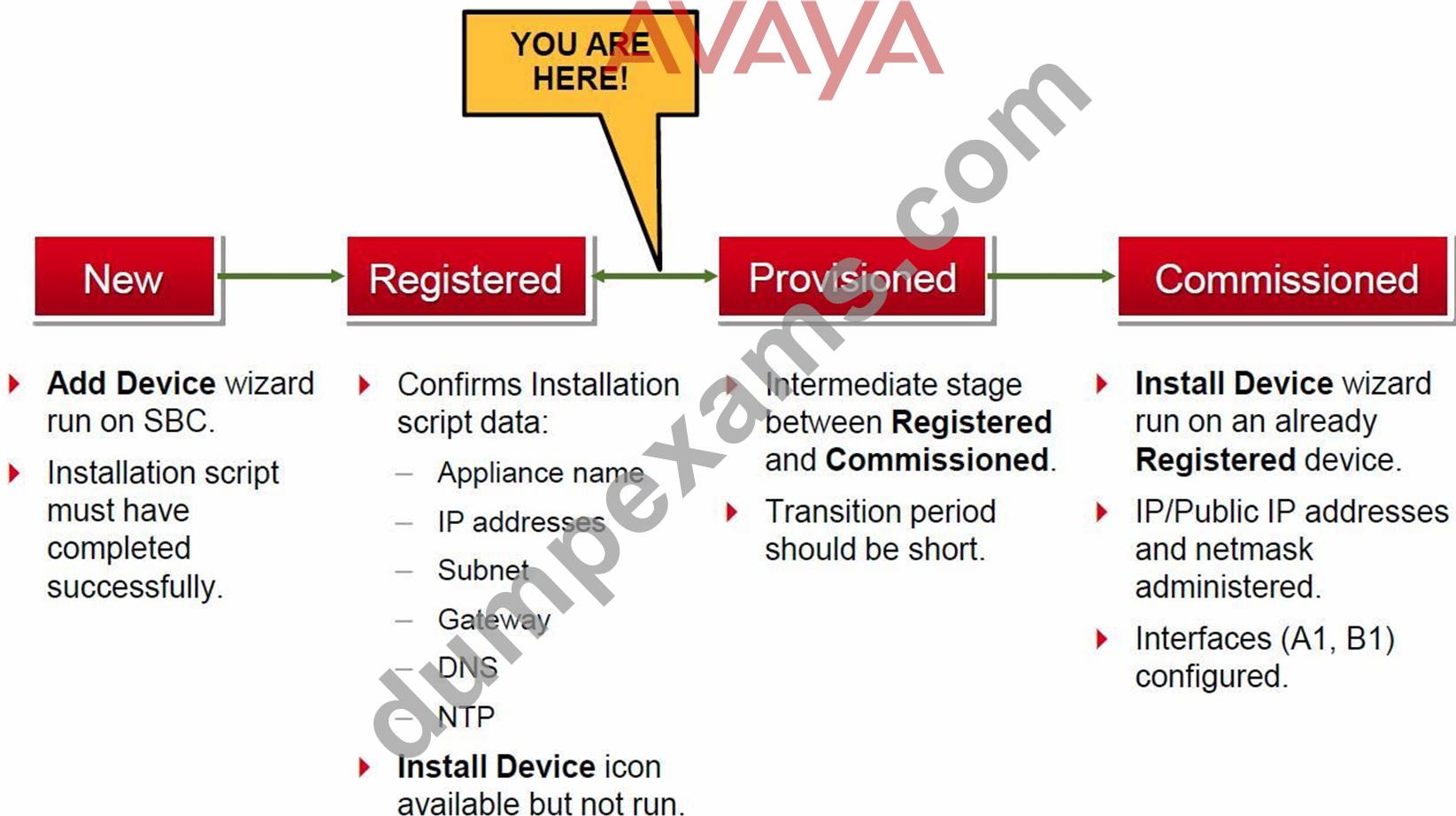
References: Avaya Aura Session Border Controller Enterprise (2012), page 201
NEW QUESTION 18
On Avaya Session Border Controller for Enterprise (SBCE), where do you access the tool that displays SIP messages, in real time, as they pass through the SBCE?
- A. from the traceSIP client installed on a local PC
- B. from the SBCE EMS Web Console
- C. from Avaya Aura System Manager, navigate to "Session Border Controller for Enterprise > SBCE Administration" menu
- D. from the SBCE Server command line via SSH session, using PuTTY
Answer: D
Explanation:
Explanation
Stat the tue Tracing Tools, TraceSM, SSH to Session Manager
1. Launch PuTTY (or similar client application) for a SSH session to Session Manager (port 22). Use the Session Manager IP Address (172.16.255.107).
2. Log in.
3. At the Session Manager command line type traceSM -x and press Enter.
Note: The traceSM tool shows the SIP call flow in Session Manager.
It gives insight into Session Manager's decisions.
Benefit: can filter certain types of SIP messages
References: Avaya Aura Session Border Controller Enterprise Implementation and Maintenance (2012), page
485
NEW QUESTION 19
Which statement describes Cross-Origin Resource Sharing (CORS)?
- A. It allows for signaling-groups to be used by more than one trunk-group.
- B. It is a W3C specification that allows cross-domain communication from the browser.
- C. It is making DSP resources available regardless of the originating location of a call.
- D. It is a network setup by which an Avaya Aura Media Server (AAMS) can be used by more than one Avaya Aura Communications Manager (CM).
Answer: B
Explanation:
Explanation
Cross-origin resource sharing (CORS) is a mechanism that allows restricted resources (e.g. fonts) on a web page to be requested from another domain outside the domain from which the first resource was served. A web page may freely embed cross-origin images, stylesheets, scripts, iframes, and videos.
Note on the History of CORS:
Cross-origin support was originally proposed by Matt Oshry, Brad Porter, and Michael Bodell of Tellme Networks in March 2004 for inclusion in VoiceXML 2.1 to allow safe cross-origin data requests by VoiceXML browsers.
In May 2006 the first W3C Working Draft was submitted. In March 2009 the draft was renamed to
"Cross-Origin Resource Sharing" and in January 2014 it was accepted as a W3C Recommendation.
References: https://en.wikipedia.org/wiki/Cross-origin_resource_sharing
NEW QUESTION 20
You want to multiplex all remote workers SIP messages to Avaya Aura Session Manager (SM) over the same TCP connection, rather than open a dedicated TCP connection for each user.
Which feature needs to be enabled for Avaya Session Border Controller for Enterprise (SBCE)?
- A. the Enable Grooming feature in the Advanced tab of the Avaya Aura Session Manager (SM) Server Profile
- B. the Enable Shared Control feature in the Signaling Interface.
- C. the Share Transport Link feature in the Advanced tab of the Avaya Aura Session Manager (SM) Server Profile
- D. the Stream Users Over Transport Link feature in the Signaling Interface
Answer: A
Explanation:
Explanation
Example: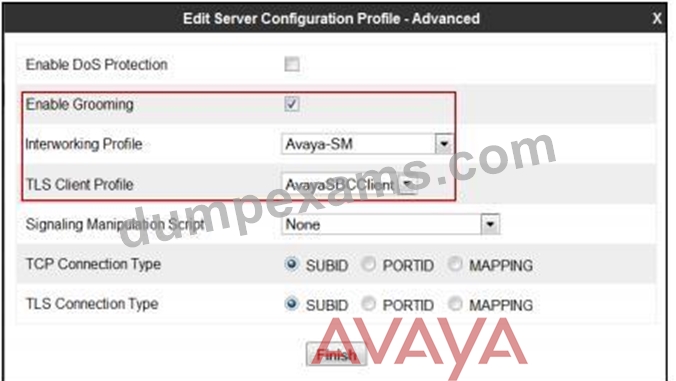
References: Configuring Remote Workers with Avaya Session Border Controller for Enterprise Rel. 6.2, Avaya Aura Communication Manager Rel. 6.3 and Avaya Aura Session Managers Rel. 6.3 - Issue 1.0, page 36
https://downloads.avaya.com/css/P8/documents/100183254
NEW QUESTION 21
What are the three components of Avaya Aura Messaging (AAM)? (Choose three.)
- A. Application Server
- B. SM100 Module
- C. Messaging Distributor
- D. AxC/Directory
- E. Messaging Store
Answer: A,D,E
Explanation:
Explanation
The AXC connector is always co-resident with the Avaya message store.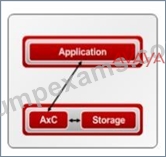
References: Administering Avaya Aura Messaging Release 6.2, Issue 2.2 (December 2013)
https://downloads.avaya.com/css/P8/documents/100172127
NEW QUESTION 22
Before SIP Trunking configuration can begin, which state must the Avaya Session Border Controller for Enterprise (SBCE) be in?
- A. Provisioned
- B. Ready
- C. Commissioned
- D. Registered
Answer: C
Explanation:
Explanation
Prerequisite Conditions for SIP Trunking
Starting point for SIP-trunking administration:
System Management > Installed tab shows SBC(s) Commissioned indicates a successful initial console configuration.
References: Avaya Aura Session Border Controller Enterprise Implementation and Maintenance (2012), page
302
NEW QUESTION 23
From a remote worker's SIP Endpoint connected via Mobile Workspace, which tool is used to trace the successful way through Avaya Session Border Controller for Enterprise (SBCE) of an Invite message?
- A. traceRT
- B. traceSM
- C. traceMW
- D. traceSBC
Answer: B
Explanation:
Explanation
traceSM is an interactive perl script that allows an administrator to capture, view, and save call processing activity on a Session Manager. While not as powerful or versatile as wireshark, traceSM is absolutely essential when it comes to working with Avaya SIP. First off, it allows you to view SIP messages even if they have been encrypted with TLS.
NEW QUESTION 24
Which statement about enabling IM and Presence for a user is true?
- A. In SMGR, edit the Communication Profile of the user to assign a XMPP handle and check the Presence profile checkbox.
- B. In SMGR, edit the Communication Profile of the user to assign an Avaya Presence/IM handle and check the Presence profile checkbox.
- C. In SMGR, edit the Communication Profile of the user to assign an Avaya SIP handle and check the Presence profile checkbox.
- D. In SMGR, edit the Communication Profile of the user to assign an Avaya E.164 handle and check the Presence profile checkbox.
Answer: C
Explanation:
Explanation
Communication Profile tab: Presence Profile
Fields include:
* The SIP Entity field used to route SIP based messages through the Presence Services.
* IM Gateway The IP address of the IM gateway
Note: Avaya SMGR stands for Avaya System Manager.
References: Administering Avaya Aura System Manager for Release 6.3.11 and later, Release 6.3 November
2016, page 554
https://downloads.avaya.com/css/P8/documents/101008185
NEW QUESTION 25
In Avaya Aura Messaging (AAM) 6.3, how many Call Answering Ports can one Application Server support?
- A. up to 10 Ports
- B. up to 1000 Ports
- C. up to 100 Ports
- D. up to 10000 Ports
Answer: C
Explanation:
Explanation
The Call Answer Ports range is 2-100.
References: Administering Avaya Aura Messaging, page 34
https://downloads.avaya.com/css/P8/documents/100112131
NEW QUESTION 26
An Avaya Aura Messaging (AAM) server intended to store Voice Messages in Avaya Message Store Mode, and you are configuring that server for integration with an Avaya Aura Core.
In Messaging Administration > Server Settings > Server Role/AxC Address, which Server Role must be chosen at the "Roles for this server" field?
- A. Storage Only
- B. Application Only
- C. AMSM
- D. Storage & Application
Answer: D
NEW QUESTION 27
......
Avaya 71300X Exam Syllabus Topics:
| Topic | Details |
|---|---|
| Topic 1 |
|
| Topic 2 |
|
| Topic 3 |
|
| Topic 4 |
|
Authentic 71300X Exam Dumps PDF - Oct-2022 Updated: https://www.dumpexams.com/71300X-real-answers.html
Download Latest 71300X Dumps with Authentic Real Exam QA's: https://drive.google.com/open?id=1lbaJOaz78Or7DzmFXQvIC96SzJ4IVYS5